
Your songs,
your tools,
your stage.

No subscriptions.Free app. Extras are one-time purchases, from $2.99.

Chord charts and setlists, together.
For rehearsal, preparation and the stage.

  • Free core app. Import, transpose, build setlists and play the set.
  • Pay once, keep it. No monthly fees. Each extra has its own 90-day trial.
  • Keeps working offline. Your charts stay in your folder.

Runs onWindowsmacOSLinuxAndroidiPad comingDownloads and details

What you’ll look at on stage.

Real screens from the Windows and Android builds, in dark and light skins, plus a 60-second video. Tap one to see it full size.

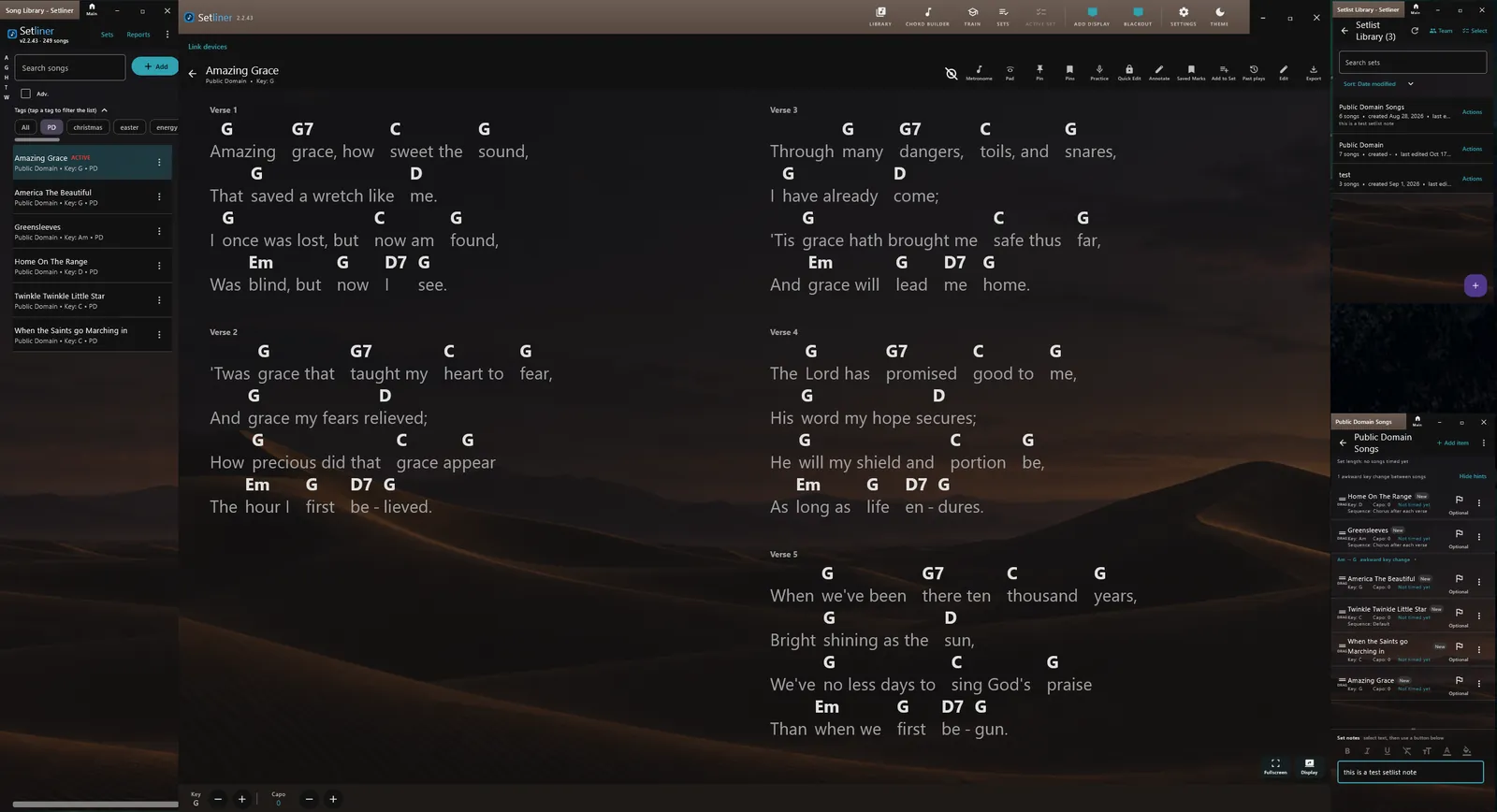
Setliner on Windows in a dark desert-dunes skin: the song library, a two-column chord chart for Amazing Grace and the setlist windows

Your set in the Desert Dunes skin · Windows

Start with the amp.

Included in the free app.
No trial clock on the essentials.

Bring your charts

Import and export ChordPro, plain text, PDF and Setliner files, or just paste a chart in. Your songs are files in a folder you choose and work offline; put it in Google Drive or OneDrive and your phone, tablet and computer share one library, no Setliner account needed.
Set the key and capo

Transpose a song or choose a capo position and every chord follows. Tap any chord to see how to play it, see other ways to play it and hear how it sounds. Give a song a different key in a setlist without changing the version in your library.

Build the setlist. Play the set.

Arrange your songs and give each one its own sequence. Draw or write markups on a chart, just as you would on paper. Open the full-screen chart viewer and use auto-scroll or a Bluetooth foot pedal to turn pages, so your hands stay on your instrument. In page mode, an optional preview shows the next line before you turn.

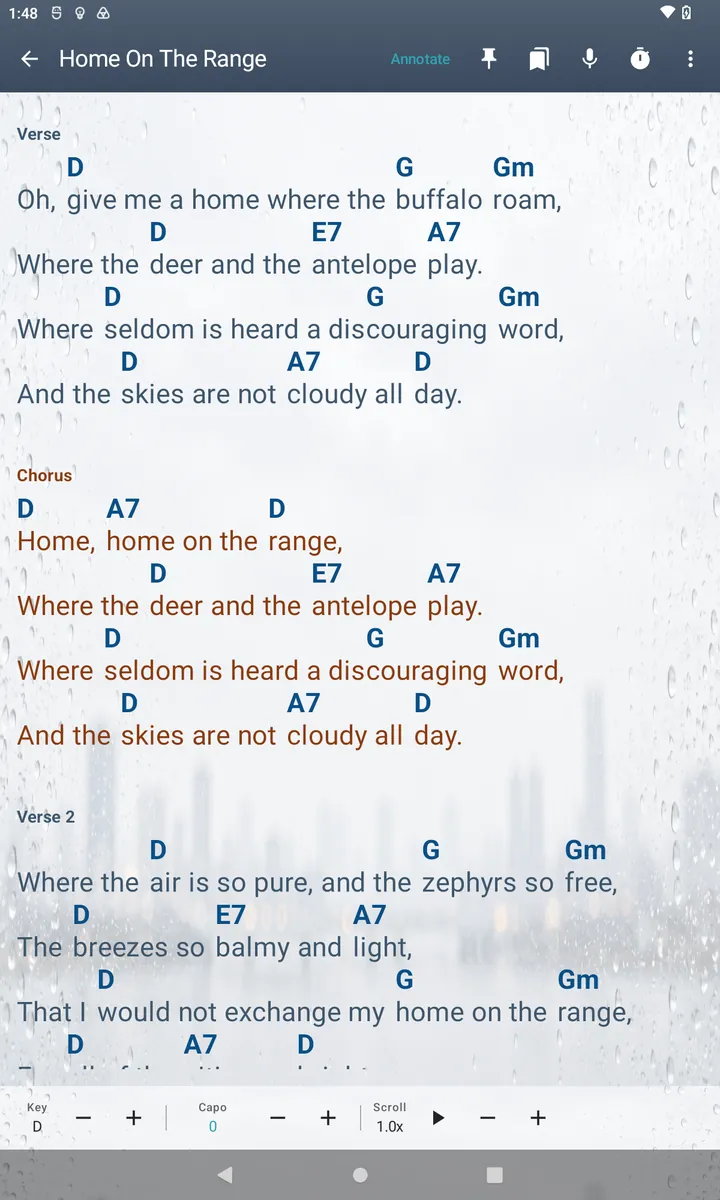
A chord chart for Home on the Range on an Android phone in a light skin, scrolling down the page, with key, capo and scroll-speed controls at the bottom
Light skin, scroll mode · Android

Plug in what you’ll use.

Every optional feature has its own 90-day free trial.

Optional features.
One-time prices in USD.

Tap the amp, mic or a pedal to explore.

Linked devicesLead a session and keep nearby devices linked together, including temporary sharing of charts and markups if the other devices are missing a song. Others join over your local network by scanning a QR code, finding the leader nearby or typing a short code from its screen.
$4.99Buy
Custom skinsTen included themes — Ice, Space, Water, Aurora, Forest Mist, Rain on Glass, Desert Dunes, and three light ones for daylight (Morning Frost, Rainy Window Daytime and Evergreen Morning) — plus your own photos and custom picture emojis in one unlock.
$4.99Buy
Chord BuilderExplore chord names and alternate voicings, save chord overrides, and explore notes on a fretboard or piano with scale overlays and related music theory.
$2.99Buy
Popout displays (desktop only)Open separate chart windows for displaying songs. Each window can be set up with different settings, including showing capo'd chords or not, or lyrics only. In follow mode, this feature supports a one-person setup that provides a lyrics display for the audience as well.
$7.99Buy
PracticePractice listens as you play guitar and marks each chord as you go. Review chord and timing marks with Play through or Play along. Use a microphone or audio interface. Available on its own or with Pro.
$9.99Buy
Setliner ProLinked devices, Custom skins, Chord Builder and Popout displays, all in one package at a discount.
$14.99Buy
Setliner Pro + PracticeAll four Pro features plus Practice for one person.
$22.99Buy

Compare your monthly cost

Compare the one-time price of Practice or Pro + Practice with what you pay for software now, assuming your monthly cost stays the same.

Price only; it doesn't compare features.

For example, $2.00 a month totals $24.00 in one year; compare that with the one-time prices above.

Every optional feature also has its own independent 90-day free trial, so you can try one before you buy it. Website purchases are sold by Polar Software, Inc. as merchant of record.

Purchases are not available to buyers in the EEA, the UK or Québec, Canada. A payment from there is refunded automatically.

Playing as a team?Schedule your band, assign roles and see who's coming.

Plan events, hand out roles and see who has said yes, all in the app. A team bundle is Setliner Pro seats at a bulk price, with Teams included free. Starting a team needs one, but people who join don’t need a seat to be on the schedule. Each seat you hand out unlocks Setliner Pro, with Practice included when you choose a Practice bundle; you keep one. Buy more than one bundle and the seats add up; you still keep only one. Everyone can add their scheduled events to the calendar app they already use (.ics or CSV), or subscribe with a private link that stays up to date.

5 seats
$49.99Buy
10 seats
$89.99Buy
5 seats with PracticePro + Practice for every seat.
$94.99Buy
10 seats with PracticePro + Practice for every seat.
$159.99Buy
Add Practice to a 5-seat teamFor a team that already owns a 5-seat bundle without Practice. Use the email you bought it with.
$45.00Buy
Add Practice to a 10-seat teamFor a team that already owns a 10-seat bundle without Practice. Use the email you bought it with.
$70.00Buy
Full licensing details ↗

Your songs stay
in your folder.

Your charts don’t need to live on our server to be on your stage.

Setliner keeps songs and setlists in a folder you choose. License checks do not send your charts or setlists.

How offline activation works

Starting a trial or activating a purchase needs a verified email address and an internet connection. After that, a cached license supports offline use for up to 90 days between successful renewals. A renewal does not extend a trial’s original deadline.

Ditch the binder.
Keep the charts.

Setliner for Windows, macOS, Linux and Android,
with iPad coming.

Download Setliner

Windows

64-bit · version 2.2.47

Or get it from the Microsoft Store.

Install notes

The installer asks whether to install it for everyone who uses the PC, or just for you.

Seeing a Chrome or Windows warning? Windows checks the installer's signature itself. Chrome may say the file "isn't commonly downloaded". That only means few people have downloaded this new installer so far; to continue, choose Keep or Download suspicious file, and check the publisher in Windows' permission prompt. The permission prompt should say Verified publisher: Setliner, LLC, and may show a numbered file name, which is Windows' own copy of the installer. A brand-new signing certificate can still bring up a blue SmartScreen screen until enough people have downloaded Setliner; if it appears, choose More info, check the publisher, then Run anyway. To check the download yourself, run Get-FileHash .\Setliner-2.2.47-Windows-Installer.msi in PowerShell and compare it with SHA256SUMS.

macOS

Apple Silicon · version 2.2.47

Verify the macOS download

Signed and notarized by Apple; requires macOS 12 or later on a Mac with Apple Silicon (M1 or later). For an Intel Mac, use the Intel download below. To check the download yourself, run shasum -a 256 Setliner-2.2.47.dmg in Terminal and compare it with SHA256SUMS.

macOS

Intel · version 2.2.47

Verify the Intel Mac download

Signed and notarized by Apple. Intel Macs: built for macOS 12 or later, tested with Apple’s Rosetta translation; email support@setliner.com if you hit a problem. To check the download yourself, run shasum -a 256 Setliner-2.2.47-macOS-x86_64.dmg in Terminal and compare it with SHA256SUMS.

Linux

Ubuntu 24.04 or later, Debian 13 or later (64-bit) · version 2.2.47

Verify the Linux download

Verify the download: SHA256SUMS, its signature and the signing key, fingerprint D271 68CF 67D8 F5CD C2B9 D5FB 6300 D17D B723 9EEB. Then run gpg --verify SHA256SUMS.asc and sha256sum -c SHA256SUMS.

Android

Phones and tablets: Get Setliner from Google Play.

Get it on Google Play

iPhone and iPad

iOS follows later.

The installers include open-source components; their source code and licences are here.

Read the FAQ ↗